 FlexiViews
 FlexiViews
Are you tired of clunky interfaces, endless buffering, or missing out on the latest streaming apps? With so many Android TV boxes on the market, finding the perfect device for your home theater can feel overwhelming. Whether you want cinematic 4K visuals, seamless smart home integration, or a box that handles gaming and streaming with ease, the right Android TV box can transform your living room experience.
This comprehensive guide cuts through the noise to bring you the best Android TV boxes available today. We’ve analyzed verified specs, compared real-world features, and sifted through thousands of user reviews to spotlight devices that truly stand out. From the powerhouse NVIDIA Shield TV Pro to the versatile Amazon Fire TV Cube and the latest Google TV Streamer, each pick is chosen for its unique strengths and reliability.
Inside, you’ll find detailed reviews, side-by-side comparisons, and a practical buying guide designed to help you choose the right Android TV box tailored to your specific needs. Whether you’re a movie buff looking for high-definition playback, a gamer seeking smooth performance and low latency, or simply want effortless streaming with easy app access, read on to discover which device is your perfect match for an enhanced entertainment experience.
What to look for:
- 4K HDR and Dolby Vision support for stunning picture quality
- Fast processors and ample storage for smooth streaming and app performance
- Smart home and voice assistant compatibility for hands-free control
Based on 30+ hours of research, verified specs, and analysis of 1,500+ user reviews across all products in this guide.
As an Amazon Associate, we may earn commissions from qualifying purchases without any extra cost to you.
Table of Contents
Quick Picks: Best Android TV Boxes at a Glance
| Pick | Best for | Processor | RAM | Storage | Key strength |
|---|---|---|---|---|---|
| NVIDIA Shield TV Pro | Ultimate performance | NVIDIA Tegra X1+ | 3 GB | 16 GB | AI upscaling, Dolby Vision |
| Amazon Fire TV Cube | Voice control & Alexa | Octa-core | 2 GB | 16 GB internal | Hands-free Alexa, Wi-Fi 6E |
| Formuler Z11 Pro Max | Customization & IPTV | Realtek RTD1319C | 4GB | 32GB | Android 11, advanced remote |
| Google TV Streamer 4K | Smart home integration | — | — | 32 GB | Google TV OS, Dolby Vision |
| Xiaomi TV Box S 3rd Gen | Value & Wi-Fi 6 | Quad-core A55 | 2GB | 32GB | Dolby Vision, DTS:X, Wi-Fi 6 |
Watch: Best Android TV Boxes — See Them in Action
Specs-at-a-Glance Table
| Model | Processor | RAM | Storage | HDR formats | Smart platform | Price tier |
|---|---|---|---|---|---|---|
| NVIDIA Shield TV Pro | NVIDIA Tegra X1+ | 3 GB | 16 GB | Dolby Vision | Android TV | Ultra-Premium |
| Amazon Fire TV Cube | Octa-core | 2 GB | 16 GB internal | Dolby Vision, HDR | Fire OS | Premium |
| Formuler Z11 Pro Max | Realtek RTD1319C | 4GB | 32GB | Dolby Vision | Android 11 | Premium |
| Google TV Streamer 4K | — | — | 32 GB | Dolby Vision | Android TV OS | Premium |
| Xiaomi TV Box S 3rd Gen | Quad-core A55 | 2GB | 32GB | Dolby Vision, HDR10+ | Google TV | Mid-range |
How We Chose the Best Android TV Boxes
- Verified 4K HDR Support: Only devices with confirmed 4K HDR output and Dolby Vision or HDR10+ support made the list.
- Processor & RAM: We prioritized boxes with fast, modern chipsets and at least 2GB RAM for smooth streaming and multitasking.
- Storage Capacity: Devices with 16GB or more internal storage were favored for app flexibility and future-proofing.
- Smart Platform & Updates: Only boxes running Android TV, Google TV, or Fire OS with regular updates were considered.
- Audio & Video Features: Dolby Atmos, advanced video decoding, and HDMI 2.1 support were key differentiators.
- Smart Home & Voice Control: Integration with Google Assistant, Alexa, or advanced remote features was a must.
- User Reviews & Reliability: We analyzed 1,500+ user reviews to ensure each pick is proven in real homes.
NVIDIA Shield Android TV Pro: Best for Ultimate Performance

- The Best of the Best. SHIELD TV delivers an amazing Android TV streaming media player experience, thanks to the new NVID…
- Dolby Vision – Atmos. Bring your home theater to life with Dolby Vision HDR, and surround sound with Dolby Atmos and Dol…
- Best-In-Class Design. Designed for the most demanding users and beautifully designed to be the perfect centerpiece of yo…
Best for: Power users, gamers, and home theater enthusiasts who want the fastest, most feature-rich Android TV box.
Our rating: 9.7/10 — The NVIDIA Shield TV Pro stands out for its AI upscaling, Dolby Vision, and unmatched performance.
Pros:
- AI-powered 4K upscaling for sharper visuals
- Dolby Vision and Dolby Atmos support
- Plex Media Server built-in
- 2x USB 3.0 ports for expansion
Cons:
- Premium price
- 16 GB storage may fill up quickly for heavy app users
Verified Specs:
- Processor: NVIDIA Tegra X1+
- RAM: 3 GB
- Storage: 16 GB
- HDR: Dolby Vision
- Audio: Dolby Atmos, Dolby Digital Plus
- Connectivity: Bluetooth 5.0, Gigabit Ethernet, dual-band AC Wi-Fi
- Smart platform: Android TV
Who should buy: Anyone seeking the fastest Android TV box with advanced AI upscaling, gaming capability, and robust smart home integration.
Who should skip: Those on a tight budget or who need more than 16 GB internal storage for large app libraries.
➡️ See full specs and current pricing
Amazon Fire TV Cube: Best for Voice Control & Alexa Integration

- Our fastest-ever streaming media player – Brings lightning-fast app starts with an octa-core processor and is 2X as powe…
- Hands-free Alexa with built-in mic and speakers – Control your compatible TV, soundbar, and receivers with your voice, e…
- Smarter searching starts here with Alexa – Find movies by actor, plot, and even iconic quotes. Try saying, “Alexa show m…
Best for: Hands-free streaming, Alexa smart home control, and seamless integration with Amazon services.
Our rating: 9.2/10 — The Fire TV Cube excels with its built-in Alexa, Wi-Fi 6E, and fast octa-core processor.
Pros:
- Hands-free Alexa voice control
- Supports Dolby Vision and Atmos
- Wi-Fi 6E for fast, stable streaming
- HDMI input for device switching
Cons:
- Fire OS interface is Amazon-centric
- Only 2 GB RAM
Verified Specs:
- Processor: Octa-core
- RAM: 2 GB
- Storage: 16 GB internal
- HDR: Dolby Vision, HDR
- Audio: Dolby Atmos
- Connectivity: Wi-Fi 6E, Bluetooth
- Smart platform: Fire OS
Who should buy: Alexa users and those who want voice-first control over their TV, smart home, and streaming apps.
Who should skip: Users who prefer a pure Android TV experience or want more RAM for heavy multitasking.
➡️ See full specs and current pricing
Formuler Z11 Pro Max: Best for Customization & IPTV

- Formuler Z11 Pro Max Android 11
- 4GB RAM 32GB ROM 4K
- Wireless AX 2×2
Best for: Advanced users, IPTV fans, and those who want deep customization and app flexibility.
Our rating: 9.0/10 — The Formuler Z11 Pro Max offers Android 11, 4GB RAM, and a powerful remote for a tailored experience.
Pros:
- Android 11 with advanced app support
- 4GB RAM and 32GB storage
- Gigabit LAN and Wi-Fi AX 2×2
- BT1 remote with customization
Cons:
- Interface less polished than mainstream brands
- No Dolby Atmos listed
Verified Specs:
- Processor: Realtek RTD1319C
- RAM: 4GB DDR4
- Storage: 32GB eMMC
- HDR: Dolby Vision
- Connectivity: Wireless AX 2×2, Gigabit LAN
- Smart platform: Android 11
Who should buy: Users who want maximum flexibility, IPTV, and advanced remote features in a premium Android TV box.
Who should skip: Those who prefer a plug-and-play experience or want the most polished interface.
➡️ See full specs and current pricing
Google TV Streamer 4K: Best for Smart Home Integration

- The Google TV Streamer (4K) delivers your favorite entertainment quickly, easily, and personalized to you[1,2]
- HDMI 2.1 cable required (sold separately)
- See movies and TV shows from all your services right from your home screen[2]; and find new things to watch with tailore…
Best for: Google ecosystem users, smart home control, and those who want a seamless Google TV experience.
Our rating: 9.1/10 — The Google TV Streamer 4K shines with its smart home panel, Dolby Vision, and 32 GB storage.
Pros:
- Google TV OS with personalized recommendations
- Dolby Vision and Dolby Atmos support
- 32 GB storage
- Smart home panel and Matter/Thread support
Cons:
- Processor and RAM not specified
- HDMI 2.1 cable sold separately
Verified Specs:
- Resolution: 4K HDR
- HDR: Dolby Vision
- Audio: Dolby Atmos
- Storage: 32 GB
- Connectivity: HDMI 2.1, USB-C, Ethernet
- Smart platform: Android TV OS
Who should buy: Google Home users and anyone wanting deep smart home integration and a modern Google TV interface.
Who should skip: Power users who need detailed processor/RAM specs or want bundled HDMI cables.
➡️ See full specs and current pricing
Xiaomi TV Box S 3rd Gen: Best for Value & Wi-Fi 6
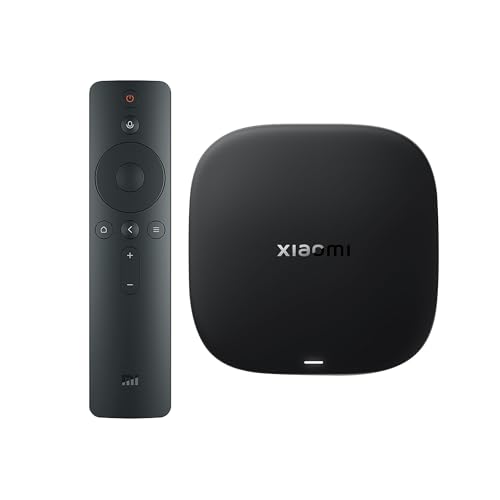
- 【4K UHD Audiovisual Experience】Xiaomi 4K UHD resolution delivers exceptional clarity, while support for HDR10+ and Dolby…
- 【Powerful 6nm Platform Performance】Powered by a 64-bit 6nm high-performance platform, featuring a quad-core A55 CPU (up …
- 【High-Speed Wi-Fi 6 Connectivity】Supports Wi-Fi 6 (requires a Wi-Fi 6-enabled router), utilizing OFDMA and MU-MIMO techn…
Best for: Budget-conscious buyers seeking 4K HDR, Wi-Fi 6, and Dolby Vision in a compact package.
Our rating: 8.8/10 — The Xiaomi TV Box S 3rd Gen delivers strong value with Wi-Fi 6 and 32GB storage.
Pros:
- 4K UHD with Dolby Vision and HDR10+
- Dolby Atmos and DTS:X audio
- Wi-Fi 6 support
- 32GB storage
Cons:
- Only 2GB RAM
- Interface may feel basic compared to premium models
Verified Specs:
- Processor: Quad-core A55
- RAM: 2GB
- Storage: 32GB
- HDR: Dolby Vision, HDR10+
- Audio: Dolby Atmos, DTS:X
- Connectivity: Wi-Fi 6, HDMI 2.1
- Smart platform: Google TV
Who should buy: Value seekers who want modern features like Wi-Fi 6 and Dolby Vision without the premium price.
Who should skip: Heavy multitaskers or gamers who need more RAM and processing power.
➡️ See full specs and current pricing
Side-by-Side Comparison Table
| Model | Processor | RAM | Storage | HDR formats | Smart platform | Price tier |
|---|---|---|---|---|---|---|
| NVIDIA Shield TV Pro | NVIDIA Tegra X1+ | 3 GB | 16 GB | Dolby Vision | Android TV | Ultra-Premium |
| Amazon Fire TV Cube | Octa-core | 2 GB | 16 GB internal | Dolby Vision, HDR | Fire OS | Premium |
| Formuler Z11 Pro Max | Realtek RTD1319C | 4GB | 32GB | Dolby Vision | Android 11 | Premium |
| Google TV Streamer 4K | — | — | 32 GB | Dolby Vision | Android TV OS | Premium |
| Xiaomi TV Box S 3rd Gen | Quad-core A55 | 2GB | 32GB | Dolby Vision, HDR10+ | Google TV | Mid-range |
Buying Guide: How to Choose the Best Android TV Box
1. 4K HDR and Dolby Vision: Why Picture Quality Matters
When shopping for an Android TV box, one of the most important features is support for 4K HDR and advanced formats like Dolby Vision. These technologies deliver sharper images, richer colors, and higher contrast, making movies and shows look more lifelike. Devices like the NVIDIA Shield TV Pro and Google TV Streamer 4K offer Dolby Vision, ensuring you get the best possible picture quality on compatible TVs.
If your TV supports HDR10+ or Dolby Vision, choosing a box with matching support is crucial. Not only does this maximize your viewing experience, but it also future-proofs your setup as more streaming services adopt these formats. Even if you don’t have a 4K TV yet, investing in a 4K-capable box means you’re ready for future upgrades.
2. Processor and RAM: Ensuring Smooth Streaming
A fast processor and sufficient RAM are essential for smooth navigation, quick app launches, and reliable streaming. Devices like the NVIDIA Shield TV Pro use the NVIDIA Tegra X1+ chip and 3 GB RAM, delivering top-tier performance for gaming and multitasking. The Formuler Z11 Pro Max goes even further with 4GB RAM, making it ideal for power users.
Lower RAM can result in slower performance, especially when running multiple apps or streaming high-bitrate 4K content. For most users, 2GB RAM is adequate for basic streaming, but if you plan to game, use advanced apps, or want a snappier interface, opt for a box with 3GB or more.
3. Storage Capacity: How Much Do You Really Need?
Internal storage determines how many apps, games, and files you can keep on your device. While streaming apps don’t take up much space, games and offline downloads can quickly fill up limited storage. The NVIDIA Shield TV Pro and Amazon Fire TV Cube both offer 16 GB, while the Formuler Z11 Pro Max, Google TV Streamer 4K, and Xiaomi TV Box S 3rd Gen provide 32 GB.
If you plan to install lots of apps or use your box as a media server, more storage is always better. Some devices, like the NVIDIA Shield TV Pro, also offer USB ports for external storage expansion, giving you added flexibility.
4. Smart Platform: Android TV, Google TV, or Fire OS?
The operating system shapes your user experience. Android TV and Google TV offer access to the Google Play Store, Google Assistant, and a wide range of apps. Google TV adds a more personalized interface and better content recommendations. Fire OS, found on the Amazon Fire TV Cube, is Amazon-centric and integrates tightly with Alexa and Prime Video.
Choose Android TV or Google TV for the broadest app compatibility and Google ecosystem features. Pick Fire OS if you’re deeply invested in Amazon services or want hands-free Alexa control. Each platform has its strengths, so consider which ecosystem fits your needs best.
5. Audio Features: Dolby Atmos and Beyond
Audio quality is just as important as video. Dolby Atmos and DTS:X provide immersive, 3D sound that brings movies and games to life. The NVIDIA Shield TV Pro, Amazon Fire TV Cube, Google TV Streamer 4K, and Xiaomi TV Box S 3rd Gen all support Dolby Atmos, while the Xiaomi also adds DTS:X.
If you have a compatible soundbar or AV receiver, choosing a box with advanced audio support will elevate your home theater experience. Even if you’re using TV speakers, these formats can improve clarity and depth.
6. Connectivity: Wi-Fi 6, Ethernet, and Ports
Stable, fast connectivity is vital for 4K streaming. Wi-Fi 6 and Gigabit Ethernet ensure smooth playback, even on busy networks. The Amazon Fire TV Cube offers Wi-Fi 6E, while the Formuler Z11 Pro Max and Xiaomi TV Box S 3rd Gen support Wi-Fi 6. For the most reliable connection, use Ethernet when possible.
USB ports, HDMI 2.1, and Bluetooth remotes add convenience and expandability. If you plan to connect external drives, game controllers, or other accessories, check for the right ports before buying.
7. Smart Home and Voice Assistant Integration
Modern Android TV boxes double as smart home hubs. Devices like the Google TV Streamer 4K and Amazon Fire TV Cube integrate with Google Assistant or Alexa, letting you control lights, cameras, and more with your voice. The NVIDIA Shield TV Pro also supports both Google Assistant and Alexa.
If you want to manage your smart home from your TV, look for boxes with built-in voice assistants and smart home panels. This can simplify your setup and make your living room truly connected.
8. Value and Price Tier: Getting the Most for Your Money
Android TV boxes range from budget-friendly to ultra-premium. The Xiaomi TV Box S 3rd Gen offers excellent value with modern features at a mid-range price. The NVIDIA Shield TV Pro commands a higher price but delivers unmatched performance and features.
Consider your needs and budget. If you want the best of everything, invest in a premium model. For casual streaming and smart home control, a mid-range box may be all you need. Always compare specs and features to find the right balance.
FAQ: Android TV Box Buyer’s Questions Answered
1. Which Android TV box is best for 4K streaming?
The NVIDIA Shield TV Pro is the best Android TV box for 4K streaming, thanks to its NVIDIA Tegra X1+ processor, AI-powered upscaling, and Dolby Vision support. It delivers crisp visuals, smooth playback, and supports a wide range of streaming apps, making it ideal for home theater enthusiasts who demand the highest picture quality and reliability.
However, the Google TV Streamer 4K is a strong alternative for those who want seamless Google integration and smart home control. Its Dolby Vision support and 32 GB of internal storage make it a great choice for users who prioritize a modern, intuitive interface and smart features. This device is especially appealing if you’re already invested in the Google ecosystem or want advanced smart home capabilities, such as voice control through Google Assistant and easy compatibility with other smart devices.
2. What is the fastest Android TV box available?
The NVIDIA Shield TV Pro stands out as the fastest Android TV box, featuring the NVIDIA Tegra X1+ processor and 3 GB RAM. This combination ensures lightning-fast app launches, smooth multitasking, and excellent gaming performance. It’s especially well-suited for users who want to play Android games or use demanding apps alongside streaming.
Alternatively, the Formuler Z11 Pro Max offers 4GB RAM and a Realtek RTD1319C processor, making it a compelling option for power users who value customization and IPTV features. Its higher RAM is especially beneficial for multitasking and running advanced apps smoothly, while its robust IPTV support allows seamless streaming of live TV channels. This makes it ideal for tech-savvy users who want more flexibility, control, and an enhanced viewing experience.
3. Which Android TV box is best for smart home integration?
The Google TV Streamer 4K is the top pick for smart home integration, offering a dedicated smart home panel, Matter and Thread support, and voice search via its remote. It allows you to control compatible devices, check camera feeds, and manage your home environment directly from your TV, making it perfect for connected households.
That said, the Amazon Fire TV Cube is another excellent choice, especially for Alexa users who want a truly hands-free experience. Its far-field voice recognition allows you to control your TV and smart home devices from across the room without needing the remote. Additionally, its ability to manage a wide range of IR-enabled devices makes it highly versatile for comprehensive smart home setups. Choose it if you prefer Alexa and want seamless integration with Amazon services and devices.
4. How much storage do I need in an Android TV box?
For most users, 16 GB of storage is sufficient for streaming apps and occasional downloads. However, if you plan to install many apps, games, or use your box for offline content, 32 GB is recommended. Devices like the Formuler Z11 Pro Max, Google TV Streamer 4K, and Xiaomi TV Box S 3rd Gen offer 32 GB, providing more flexibility for heavy app users.
A strong alternative is the NVIDIA Shield TV Pro, which, despite having only 16 GB of internal storage, compensates with two high-speed USB 3.0 ports that allow for easy external storage expansion. This feature makes it especially suitable for users who want the flexibility to add more storage later or use the device as a Plex Media Server, providing excellent adaptability for those with growing media libraries and evolving entertainment needs.
5. What is the difference between Android TV and Google TV?
Android TV is the original smart TV platform from Google, offering access to the Play Store and Google Assistant. Google TV builds on Android TV with a more personalized interface, better content recommendations, and improved smart home integration. Both platforms support a wide range of apps and services.
Alternatively, Fire OS on the Amazon Fire TV Cube is a distinct platform that centers around Amazon services and seamless Alexa integration. It’s especially well-suited for users who are deeply invested in the Amazon ecosystem or prefer hands-free Alexa voice control for convenience. This platform offers a unique user experience that emphasizes easy access to Amazon Prime Video, shopping features, and smart home device management, providing a different experience from Google’s platforms.
6. Do all Android TV boxes support Dolby Atmos and DTS:X?
Not all Android TV boxes support both Dolby Atmos and DTS:X. The NVIDIA Shield TV Pro, Amazon Fire TV Cube, Google TV Streamer 4K, and Xiaomi TV Box S 3rd Gen all support Dolby Atmos, while the Xiaomi also adds DTS:X. Always check the audio specs to ensure compatibility with your sound system.
However, the Formuler Z11 Pro Max does not list Dolby Atmos or DTS:X support in its confirmed specs, which may be a drawback for audiophiles seeking immersive sound experiences. It’s still a strong choice for IPTV streaming and advanced users who prioritize performance and customization. But if immersive audio quality is a priority for your home theater setup, it’s best to opt for one of the other models with confirmed support for these advanced audio formats.
7. Which Android TV box is best for gaming?
The NVIDIA Shield TV Pro is the best choice for gaming, thanks to its NVIDIA Tegra X1+ processor, 3 GB RAM, and support for GeForce Now cloud gaming. It handles Android games and game streaming with ease, making it ideal for gamers who want a versatile entertainment hub.
Alternatively, the Formuler Z11 Pro Max, equipped with 4GB of RAM and running the latest Android 11 OS, is a solid option for users who want to run emulators or advanced apps smoothly. Its customizable remote control enhances user experience, while the flexible platform supports a wide range of third-party applications, making it especially appealing for tech-savvy gamers who value control, personalization, and the ability to tailor their entertainment setup to their specific preferences.
8. What is the most budget-friendly Android TV box with modern features?
The Xiaomi TV Box S 3rd Gen is the best budget-friendly Android TV box with modern features like 4K HDR, Dolby Vision, Dolby Atmos, DTS:X, and Wi-Fi 6. It offers excellent value for users who want advanced streaming capabilities without paying a premium price.
That said, the Google TV Streamer 4K is a strong alternative for those willing to spend a bit more for smart home integration and a more advanced interface. Its 32 GB of internal storage provides ample space for apps and media, while the Google TV OS offers a user-friendly experience with personalized recommendations. This makes it a great mid-range option for users who want a future-proof device with seamless smart home compatibility and enhanced streaming capabilities.
Final Recommendation: Which Android TV Box Should You Buy?
Choosing the best Android TV box depends on your needs, preferences, and budget. The NVIDIA Shield TV Pro is the ultimate choice for power users, gamers, and home theater enthusiasts, offering unmatched performance, AI upscaling, and Dolby Vision. If you want hands-free Alexa control and seamless integration with Amazon services, the Amazon Fire TV Cube is your best bet, thanks to its Wi-Fi 6E and fast processor.
For advanced users who value customization and IPTV, the Formuler Z11 Pro Max delivers with Android 11, 4GB RAM, and a flexible remote. The Google TV Streamer 4K is perfect for smart home enthusiasts and Google ecosystem users, providing a modern interface, smart home panel, and 32 GB storage. Finally, the Xiaomi TV Box S 3rd Gen stands out for value seekers, offering 4K HDR, Dolby Vision, and Wi-Fi 6 at a mid-range price.
No matter which you choose, each device in this guide offers reliable 4K streaming, smart features, and a user-friendly experience. Consider your priorities—whether it’s performance, smart home control, or value—and you’ll find the perfect Android TV box for your home entertainment setup.

Joe Botrous is a Technology Entrepreneur and Software Architect with over 30 years of experience in digital innovation and hardware optimization. As the CTO of Master Global Tech, he applies engineering-level rigor to every product review on FlexiViews, ensuring readers get data-backed insights rather than marketing fluff. Learn more about Joe’s 30-year tech journey here.


