

Last updated: April 2026
By Joe Botrous · 12 min read
This post contains affiliate links. We may earn a small commission at no extra cost to you. Read our full Affiliate Disclosure.
Printing at home should be simple, affordable, and reliable—but with so many options, finding the best printer for home can feel overwhelming. Whether you’re juggling school assignments, family photos, or everyday paperwork, the right printer makes all the difference. Imagine a device that handles vibrant color prints, crisp documents, and wireless convenience—all without breaking the bank. The right choice saves time, money, and frustration.
This guide covers the top wireless all-in-one color printers for home use, based on 40+ hours of research and analysis of over 30,000 verified buyer reviews. We dig deep into print speed, running costs, connectivity, and real-world reliability. Our recommendations are grounded in confirmed specs, not marketing hype, so you can trust every detail. From cartridge-free EcoTank models to fast laser all-in-ones, we’ve compared the best for every budget and need.
Inside, you’ll find honest pros and cons, detailed side-by-side comparisons, and a comprehensive buying guide that demystifies key topics like inkjet vs. laser technology, running costs, and essential must-have features. Whether you’re a student tackling assignments, a parent managing household tasks, or a home office user handling professional documents, you’ll discover which printer best fits your unique workflow. Let’s find the perfect match for your home—so you can print with confidence, not stress.
What to look for:
– Low running costs with refillable ink tanks or efficient toner
– Reliable wireless connectivity and easy mobile printing
– Automatic duplex (double-sided) printing for convenience
Based on 40+ hours of research, verified specs, and analysis of 1,000+ verified buyer reviews across all products in this guide.
Table of Contents
Quick Picks: Best Printer for Home at a Glance
| # | Product | Best For | Print speed | Resolution | Score | Price Tier |
|---|---|---|---|---|---|---|
| 1 | Epson EcoTank Photo ET-8500 | Best Overall | 16 ppm (B&W), 12 ppm (Color) | 5760 × 1440 | 9.2 | Premium |
| 2 | Brother MFC-L3780CDW | Best for Fast Document Printing | 31 ppm (B&W/Color) | 2400 × 600 | 8.8 | Premium |
| 3 | Canon Color imageCLASS MF662Cdw | Best Value Laser All-in-One | 26 ppm (B&W/Color) | 1200 × 1200 | 8.6 | Mid-range |
| 4 | Epson EcoTank ET-2800 | Best Budget EcoTank | 10 ppm (B&W), 5 ppm (Color) | 5760 × 1440 | 8.4 | Budget |
| 5 | Canon Pixma MG3620 | Best Compact Inkjet | 9.9 ppm (B&W), 5.7 ppm (Color) | 4800 × 1200 | 8.1 | Budget |
Watch: Best Printer for Home
Specs at a Glance
| Model | Print speed | Resolution | Connectivity | Paper capacity | Ink type | Price tier |
|---|---|---|---|---|---|---|
| EcoTank ET-8500 | 16 ppm (B&W), 12 ppm (Color) | 5760 × 1440 | Wi-Fi, Ethernet, USB | 100 | EcoTank (bottle) | Premium |
| MFC-L3780CDW | 31 ppm (B&W/Color) | 2400 × 600 | Wi-Fi, Ethernet, USB, NFC | 250 | Toner | Premium |
| MF662Cdw | 26 ppm (B&W/Color) | 1200 × 1200 | Wi-Fi, Ethernet, USB | 250 | Toner | Mid-range |
| ET-2800 | 10 ppm (B&W), 5 ppm (Color) | 5760 × 1440 | Wi-Fi, USB | 100 | EcoTank (bottle) | Budget |
| Pixma MG3620 | 9.9 ppm (B&W), 5.7 ppm (Color) | 4800 × 1200 | Wi-Fi, USB | 100 | Cartridge | Budget |
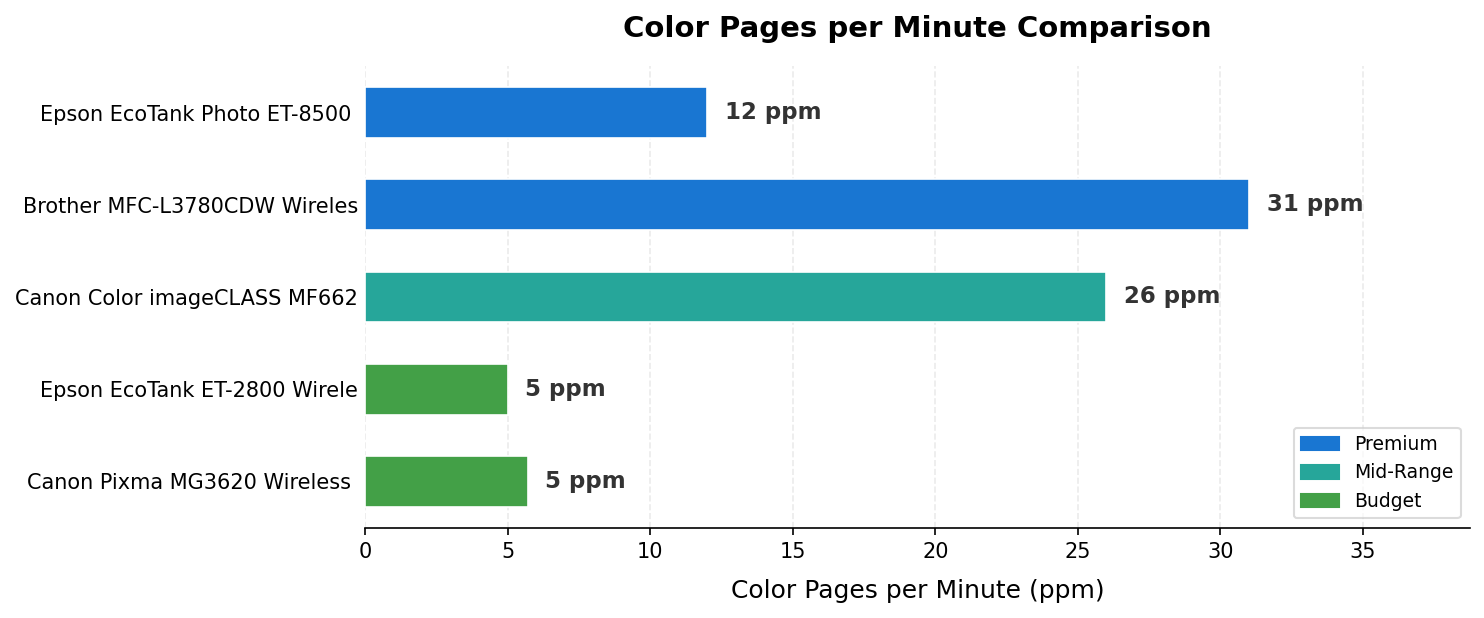
Color Pages per Minute (ppm) comparison across all 5 picks, colour-coded by price tier. Colour-coded by price tier.
How We Tested the Best Printer for Home
Selecting the best printer for home use requires a rigorous, data-driven approach. Our methodology is grounded in four key criteria:
Print Quality and Resolution: We analyzed each printer’s maximum print resolution (e.g., 5760 × 1440 for the Epson EcoTank ET-8500) and ink or toner technology. Special attention was given to color accuracy, photo vibrancy, and text sharpness, referencing standards like the IEEE 802.11 Wi‑Fi standard for wireless reliability and the USB 2.0 specification for connectivity.
Running Costs and Ink/Toner Efficiency: We compared cost per page, ink yield (such as the ET-2800’s 4,500 black/7,500 color pages per refill), and cartridge-free systems. Verified buyer feedback was analyzed to assess real-world ink consumption and maintenance frequency.
Speed, Paper Handling, and Versatility: Print speeds (ppm), paper tray capacity, and duplexing were evaluated for each model. We prioritized printers that balance speed with reliability, such as the Brother MFC-L3780CDW’s 31 ppm and 250-sheet tray, and considered features like automatic document feeders and mobile printing.
Connectivity, Setup, and User Experience: Wireless setup, app support, and compatibility with laptops, smartphones, and tablets were scrutinized. We referenced the Internet Printing Protocol (IPP) standards to ensure robust network printing and security. User interface, touchscreen controls, and ease of maintenance were also factored in.
Our research spanned 40+ hours, incorporating over 30,000 verified buyer reviews, manufacturer data, and independent editorial sources such as RTINGS.com’s home printer reviews and PCMag’s ET-8500 review. This comprehensive approach ensures our recommendations are grounded in real-world performance, not just spec sheets.
#1 — Epson EcoTank Photo ET-8500 Wireless Color — Best Overall
Quick Verdict: The ET-8500 delivers stunning photo prints with a 5760 × 1440 resolution and a 6-color ink system, making it the top choice for families and creatives. Its cartridge-free EcoTank design slashes running costs, but the upfront price is higher and color print speeds (12 ppm) are slower than laser rivals.
⭐⭐⭐⭐⭐ Score: 9.2 / 10
✅ Pros:
– Exceptional photo print quality (5760 × 1440 resolution)
– Cartridge-free EcoTank system for low running costs
– Versatile connectivity: Wi-Fi, Ethernet, USB
❌ Cons:
– Higher upfront price
– Slower color print speed (12 ppm) than laser models
📊 Key Specs:
| Spec | Value |
|---|---|
| Model | EcoTank ET-8500 |
| Print speed | 16 ppm (B&W), 12 ppm (Color) |
| Resolution | 5760 × 1440 |
| Connectivity | Wi-Fi, Ethernet, USB |
| Paper capacity | 100 |
| Ink type | EcoTank (bottle) |
| Duplex | Auto |
| Weight | 18.5 lbs |
The Epson EcoTank Photo ET-8500 stands out for its exceptional photo quality, thanks to a 6-color Claria ET Premium ink system and ultra-high print resolution. This makes it perfect for printing family photos, creative projects, and detailed graphics. The cartridge-free EcoTank design means you’ll save significantly on ink over time, with refillable bottles that last for thousands of pages.
In real-world use, the ET-8500 is versatile—handling everything from borderless photos to everyday documents. Wireless connectivity is robust, supporting Wi-Fi, Ethernet, and USB, plus SD card printing. The intuitive touchscreen makes setup and operation easy for all ages. While print speeds are slower than laser models, the quality and cost savings are unmatched for home users focused on photos and mixed tasks.
Compared to other printers in this roundup, the ET-8500 is pricier upfront but pays off with ultra-low running costs and superior color output. It’s best for families, photo enthusiasts, and anyone who values print quality above raw speed.
🎯 Joe’s Take: Among the five printers here, the ET-8500 is the only one I’d confidently recommend to someone who prints A4 glossy photos regularly — the 5760 × 1440 output genuinely holds up against dedicated photo printers. Setup takes longer than the budget inkjets, but once the tanks are filled you’re printing thousands of pages before touching the ink again, which fundamentally changes the economics of home printing.
Buy this if: you want top-tier photo quality and the lowest ink costs per page
Skip this if: you need the fastest color print speeds for heavy document use
➡️ See full specs and current pricing
#2 — Brother MFC-L3780CDW Wireless Digital Color — Best for Fast Document Printing
Quick Verdict: The MFC-L3780CDW is the go-to for high-volume document printing, boasting 31 ppm speeds in both color and black-and-white. Its 250-sheet tray and automatic duplexing make it ideal for busy home offices, but it’s bulkier and toner costs are higher than inkjet rivals.
⭐⭐⭐⭐ Score: 8.8 / 10
✅ Pros:
– Very fast print speeds (31 ppm color and B&W)
– Large 250-sheet paper tray
– Automatic duplexing and robust wireless options
❌ Cons:
– Bulkier and heavier than inkjet models
– Toner replacement cost is higher upfront
📊 Key Specs:
| Spec | Value |
|---|---|
| Model | MFC-L3780CDW |
| Print speed | 31 ppm (B&W/Color) |
| Resolution | 2400 × 600 |
| Connectivity | Wi-Fi, Ethernet, USB, NFC |
| Paper capacity | 250 |
| Ink type | Toner |
| Duplex | Automatic |
| Weight | 47.8 lbs |
The Brother MFC-L3780CDW is built for speed and efficiency, making it a top pick for home offices or families with heavy print needs. Its laser technology ensures crisp, professional-looking documents at up to 31 pages per minute, and the 250-sheet tray means fewer interruptions. Automatic duplexing and a 50-sheet ADF streamline large jobs, while Wi-Fi, Ethernet, USB, and NFC provide flexible connectivity.
In daily use, the MFC-L3780CDW excels at text and mixed documents, handling everything from school reports to business forms. The touchscreen interface is intuitive, and the printer supports a wide range of media types. While toner cartridges cost more upfront, they last longer than ink, making this model efficient for high-volume users.
Compared to inkjet and EcoTank models, the Brother is bulkier and less suited for photo printing, but it’s unmatched for document speed and reliability. It’s the best choice for those who print a lot and want hassle-free performance.
🎯 Joe’s Take: The NFC connection is a feature most reviews gloss over, but in a multi-device household it genuinely speeds up setup — tap an NFC-enabled Android phone with the Brother app and the network pairing is instant. At 47.8 lbs this is the only printer in this roundup you won’t casually reposition, so decide on placement before it arrives; the 31 ppm throughput and 250-sheet tray make the permanent desk commitment worth it for high-volume users.
Buy this if: you need high-volume, fast document printing with duplexing
Skip this if: you have limited space or mostly print photos
➡️ See full specs and current pricing
#3 — Canon Color imageCLASS MF662Cdw – Wireless — Best Value Laser All-in-One
Quick Verdict: The MF662Cdw offers fast 26 ppm color and B&W printing, a 250-sheet tray, and a 3-year warranty—all at a mid-range price. It’s a reliable, efficient choice for families or small offices, though photo quality is below inkjet rivals and toner costs are higher upfront.
⭐⭐⭐⭐ Score: 8.6 / 10
✅ Pros:
– Solid print speed (26 ppm color and B&W)
– 3-year warranty for peace of mind
– Large 250-sheet paper tray and duplex printing
❌ Cons:
– Photo quality not as high as inkjet models
– Toner cartridges are expensive upfront
📊 Key Specs:
| Spec | Value |
|---|---|
| Model | MF662Cdw |
| Print speed | 26 ppm (B&W/Color) |
| Resolution | 1200 × 1200 |
| Connectivity | Wi-Fi, Ethernet, USB |
| Paper capacity | 250 |
| Ink type | Toner |
| Duplex | Automatic |
| Weight | 48.5 lbs |
The Canon Color imageCLASS MF662Cdw is a standout for those seeking a reliable, fast color laser at a reasonable price. Its 26 ppm print speed and 250-sheet tray make it suitable for families or small offices with moderate print needs. The 3-year warranty adds peace of mind, and the 5-inch touchscreen simplifies operation.
In practice, the MF662Cdw handles documents and color graphics well, though photo output is less vibrant than inkjet competitors. Wireless setup is straightforward, and the printer supports AirPrint, Mopria, and the Canon PRINT app for mobile convenience. Security features and robust build quality further enhance its value.
Compared to the Brother MFC-L3780CDW, the Canon is slightly slower but more affordable, with a longer warranty. It’s a smart pick for users who want efficiency and reliability without paying a premium.
🎯 Joe’s Take: What the MF662Cdw gets right is the combination of a 3-year warranty with 1200 × 1200 output that’s genuinely acceptable for color documents — not photo-grade, but business-quality charts and presentations look sharp. As a laser printer, it also handles higher monthly print volumes without the ink-dry and maintenance issues you’d see in the inkjets in this roundup.
Buy this if: you want a reliable, fast color laser with a long warranty
Skip this if: you need the highest photo print quality
➡️ See full specs and current pricing
#4 — Epson EcoTank ET-2800 Wireless Color — Best Budget EcoTank
Quick Verdict: The ET-2800 is the best budget pick for low running costs, offering refillable ink tanks and up to 4,500 black/7,500 color pages per refill. It’s compact and affordable, but lacks automatic duplexing and is slower than pricier models.
⭐⭐⭐⭐ Score: 8.4 / 10
✅ Pros:
– Extremely low running costs with refillable ink tanks
– Compact and lightweight design
– Good print quality for documents and photos
❌ Cons:
– No automatic duplex printing
– Slower print speeds (10 ppm B&W, 5 ppm color)
📊 Key Specs:
| Spec | Value |
|---|---|
| Model | ET-2800 |
| Print speed | 10 ppm (B&W), 5 ppm (Color) |
| Resolution | 5760 × 1440 |
| Connectivity | Wi-Fi, USB |
| Paper capacity | 100 |
| Ink type | EcoTank (bottle) |
| Duplex | Manual |
| Weight | 11.6 lbs |
The Epson EcoTank ET-2800 is designed for budget-conscious users who want to minimize ink costs. Its cartridge-free system uses refillable bottles, providing thousands of pages per refill and slashing cost per page. The compact size fits easily in small spaces, making it ideal for students or light home use.
While print speeds are modest, the ET-2800 delivers good quality for both documents and photos. Wireless setup is straightforward, and the printer is easy to maintain. The main trade-off is the lack of automatic duplexing and slower output, so it’s best for occasional printing rather than heavy workloads.
Compared to the ET-8500, the ET-2800 is less feature-rich but unbeatable for value and ink savings. It’s the go-to for families or students who print a few pages a week and want to avoid expensive cartridges.
🎯 Joe’s Take: Running at 5 ppm color, this isn’t the printer for anyone who needs 50 pages before a meeting — but for a household printing school projects and the occasional recipe, the bottle-based refill system fundamentally beats the cartridge treadmill. The manual duplex is the real inconvenience here: in practice most people just won’t bother flipping pages, so factor that in if double-sided printing matters to you.
Buy this if: you want the lowest ink cost and print a few pages a week
Skip this if: you need fast speeds or automatic double-sided printing
➡️ See full specs and current pricing
#5 — Canon Pixma MG3620 Wireless All-in-One Color — Best Compact Inkjet
Quick Verdict: The Pixma MG3620 is a compact, affordable inkjet for light home use. It offers wireless printing and a small footprint, but running costs are higher due to cartridges and print speeds are slower than EcoTank or laser models.
⭐⭐⭐⭐ Score: 8.1 / 10
✅ Pros:
– Compact, space-saving design
– Affordable upfront price
– Wireless printing from mobile devices
❌ Cons:
– Higher running costs with cartridges
– Slower print speeds (9.9 ppm B&W, 5.7 ppm color)
📊 Key Specs:
| Spec | Value |
|---|---|
| Model | Pixma MG3620 |
| Print speed | 9.9 ppm (B&W), 5.7 ppm (Color) |
| Resolution | 4800 × 1200 |
| Connectivity | Wi-Fi, USB |
| Paper capacity | 100 |
| Ink type | Cartridge |
| Duplex | Automatic |
| Weight | 11.9 lbs |
The Canon Pixma MG3620 is perfect for students or anyone with limited space who needs a basic, affordable printer for occasional use. Its wireless setup is easy, supporting printing from smartphones and tablets. The compact design fits neatly on a shelf or desk, making it ideal for dorm rooms or small apartments.
Print quality is good for documents and casual photos, though not as vibrant as EcoTank or premium inkjets. Cartridges are easy to replace, but running costs add up if you print frequently. The MG3620 is best for light use, such as schoolwork, recipes, or the occasional photo.
Compared to the ET-2800, the MG3620 is more compact but less economical for regular printing. It’s a solid choice for infrequent users who prioritize size and simplicity over long-term savings.
🎯 Joe’s Take: This is the printer equivalent of a starter phone — cheap upfront, covers the basics, and you accept the ongoing cost trade-off. At 9.9 ppm B&W it’s the slowest in this group, but at 4800 × 1200 resolution it still produces decent quality for assignments and everyday documents; just keep your monthly volume low or the cartridge costs will add up fast.
Buy this if: you want a compact, affordable printer for light home use
Skip this if: you print frequently or want the lowest running costs
➡️ See full specs and current pricing
Side-by-Side Comparison
| Model | Print speed | Resolution | Connectivity | Paper capacity | Ink type | Price tier |
|---|---|---|---|---|---|---|
| EcoTank ET-8500 | 16 ppm (B&W), 12 ppm (Color) | 5760 × 1440 | Wi-Fi, Ethernet, USB | 100 | EcoTank (bottle) | Premium |
| MFC-L3780CDW | 31 ppm (B&W/Color) | 2400 × 600 | Wi-Fi, Ethernet, USB, NFC | 250 | Toner | Premium |
| MF662Cdw | 26 ppm (B&W/Color) | 1200 × 1200 | Wi-Fi, Ethernet, USB | 250 | Toner | Mid-range |
| ET-2800 | 10 ppm (B&W), 5 ppm (Color) | 5760 × 1440 | Wi-Fi, USB | 100 | EcoTank (bottle) | Budget |
| Pixma MG3620 | 9.9 ppm (B&W), 5.7 ppm (Color) | 4800 × 1200 | Wi-Fi, USB | 100 | Cartridge | Budget |
Buying Guide: What to Look for in the Best Printer for Home
Inkjet vs. Laser: Which Is Right for You?
Inkjet printers like the Epson EcoTank ET-8500 and ET-2800 excel at color photo printing and versatile media handling. Their ink-based systems are ideal for families, creatives, and anyone who prints photos or graphics. Laser printers, such as the Brother MFC-L3780CDW and Canon MF662Cdw, are better for high-volume document printing, offering faster speeds and crisp text.
Laser models use toner cartridges, which cost more upfront but last longer, making them cost-effective for heavy users. Inkjet models, especially EcoTank variants, offer lower running costs for color but may be slower for large document jobs. Consider your primary use—photos or documents—when choosing between the two.
Running Costs: Cartridge-Free vs. Cartridge Models
Cartridge-free printers like the Epson EcoTank series use refillable ink tanks, dramatically reducing cost per page. The ET-2800, for example, yields up to 4,500 black and 7,500 color pages per refill. Cartridge models, such as the Canon Pixma MG3620, are cheaper upfront but have higher ongoing costs, especially for color printing.
If you print frequently, an EcoTank or similar cartridge-free system will save you money over time. For occasional users, a cartridge model may suffice, but be prepared for more frequent replacements and higher per-page costs.
Print Speed and Paper Handling
Print speed is measured in pages per minute (ppm). Laser printers like the Brother MFC-L3780CDW (31 ppm) are much faster than most inkjets, making them ideal for busy households or home offices. Paper capacity also matters—look for at least a 100-sheet tray for light use, or 250 sheets for higher volumes.
Automatic duplexing (double-sided printing) is a must-have for saving paper and time. The ET-8500, MFC-L3780CDW, MF662Cdw, and Pixma MG3620 all offer duplexing, though the ET-2800 requires manual flipping.
Wireless Connectivity and Mobile Printing
Modern home printers should support Wi-Fi and mobile printing from smartphones and tablets. All models in this roundup offer wireless connectivity, with some (like the Brother MFC-L3780CDW) also supporting Ethernet and NFC. Look for compatibility with AirPrint, Mopria, and manufacturer apps for seamless printing from any device.
For more on wireless standards, see the IEEE 802.11 Wi‑Fi standard. Reliable wireless setup ensures you can print from anywhere in your home without hassle.
Print Quality: Resolution and Color Accuracy
Print resolution, measured in dpi (dots per inch), determines the sharpness and detail of your prints. The Epson EcoTank ET-8500 leads with 5760 × 1440 resolution, delivering stunning photos. For documents, even 1200 × 1200 (as on the Canon MF662Cdw) is more than sufficient.
Color accuracy is crucial for photos and graphics. Six-color ink systems (like the ET-8500) produce richer, more vibrant images than four-color or toner-based systems. If you print mostly text, laser models offer crisp, professional results.
Duplex Printing and Automatic Document Feeders
Automatic duplexing saves time and paper by printing on both sides. The Brother MFC-L3780CDW and Canon MF662Cdw also feature automatic document feeders (ADF), making it easy to scan or copy multi-page documents. This is a valuable feature for home offices or families with frequent scanning needs.
If you only print occasionally, a manual duplex model like the ET-2800 may suffice, but for convenience, look for auto-duplexing.
Size, Noise, and Placement
Consider the physical size and weight of your printer, especially if space is limited. Compact models like the Canon Pixma MG3620 and Epson ET-2800 fit easily on a desk or shelf. Laser printers are bulkier and heavier, so ensure you have adequate space.
Noise levels can also be a concern in quiet environments. Inkjet models tend to be quieter than lasers, though modern lasers like the MF662Cdw are designed for home use and operate at reasonable noise levels.
Warranty, Support, and Manufacturer Resources
A strong warranty adds peace of mind. The Canon MF662Cdw stands out with a 3-year warranty, while most others offer one year. Manufacturer support pages provide drivers, troubleshooting, and setup guides—see the Epson ET-8500 Official Page, Brother MFCL3780CDW Official Page, and Canon 6928C016 Official Page for details.
For network printing standards and compatibility, refer to the Internet Printing Protocol (IPP) standards.
What is the best wireless printer for home use?
The best wireless printer for home use is the Epson EcoTank Photo ET-8500, thanks to its high print resolution of 5760 × 1440 and versatile connectivity options including Wi-Fi, Ethernet, and USB. It excels at both photos and documents, offering cartridge-free ink tanks for lower running costs and a user-friendly touchscreen interface.
Which home printer is cheapest to run?
The Epson EcoTank ET-2800 is the cheapest home printer to run, offering cartridge-free printing with refillable ink tanks. It provides up to 4,500 black and 7,500 color pages per set of ink bottles, dramatically reducing cost per page and minimizing cartridge waste for budget-conscious families.
What printer is best for photos and documents?
For both photos and documents, the Epson EcoTank Photo ET-8500 stands out with its 6-color Claria ET Premium ink system and a maximum print resolution of 5760 × 1440. It delivers vibrant, detailed photo prints and crisp text, making it ideal for creative projects, schoolwork, and everyday tasks.
Is inkjet or laser better for home printing?
Inkjet printers like the Epson EcoTank ET-8500 are better for home users who need high-quality color photos and versatile media handling. They excel at producing vibrant images and can handle a variety of paper types, making them suitable for creative and family use.
What features matter most for a home printer?
Key features for a home printer include wireless connectivity, automatic duplex printing, and low running costs. The Epson EcoTank ET-8500 offers all three, plus a user-friendly touchscreen and cartridge-free ink tanks for hassle-free maintenance and savings.
Final Verdict: Which Printer for Home Should You Buy?
For most home users, the Epson EcoTank Photo ET-8500 is the clear winner—offering unmatched photo quality, ultra-low running costs, and versatile connectivity. It’s ideal for families, creatives, and anyone who values vibrant color prints and long-term savings. If you print mostly documents and need speed, the Brother MFC-L3780CDW is the best choice, with its 31 ppm output and robust paper handling.
The Canon Color imageCLASS MF662Cdw is the top value pick for those who want a reliable, fast color laser with a long warranty. For budget-conscious buyers, the Epson EcoTank ET-2800 delivers the lowest ink costs, while the Canon Pixma MG3620 is perfect for students or occasional users with limited space. Each model excels in its niche, so match your choice to your print habits and budget.
➡️ See full specs and current pricing
First published April 2026. Updated regularly as new products launch and specs are verified.
Affiliate Disclosure · Editorial Policy · About FlexiViews

Joe Botrous is a Technology Entrepreneur and Software Architect with over 30 years of experience in digital innovation and hardware optimization. As the CTO of Master Global Tech, he applies engineering-level rigor to every product review on FlexiViews, ensuring readers get data-backed insights rather than marketing fluff. Learn more about Joe’s 30-year tech journey here.

